I Love The Smiths AI Video Generator: You in the 500 Days of Summer Elevator Scene
Put two people in the viral I Love The Smiths elevator scene from two photos: one wears the headphones, the other says “I love the Smiths”, says it again, and walks out. Voices and elevator sounds included, online, no app, no prompt.
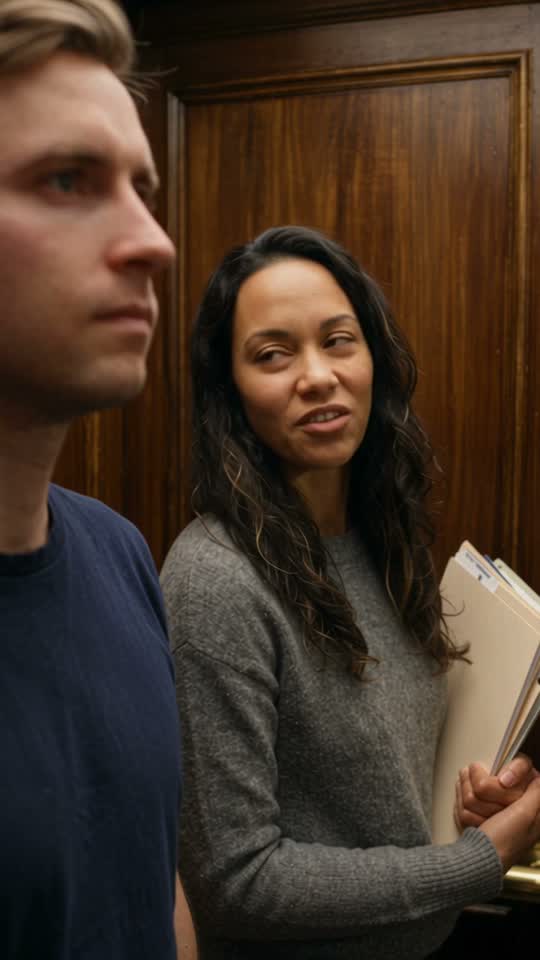
I Love The Smiths AI Video Generator: the short answer
Vuddex’s I Love The Smiths AI Video Generator puts two people in the viral elevator scene from 500 Days of Summer, from two photos: the first wears the headphones, the second leans over and says “I love the Smiths”, says it again louder, hums along and walks out, leaving the first one frozen. With one photo, you wear the headphones and the AI invents the stranger. The voices and elevator sounds are in the clip. You get an MP4 of 11 or 15 seconds in a few minutes — 720p and vertical 9:16 by default — from 150 credits (about $3.75–$5.00) at 480p. No filming and no prompt to write, and a clip that fails to generate is refunded automatically.
| Two photos | One photo | |
|---|---|---|
| You upload | 2 photos | 1 photo |
| Length | 11 / 15 seconds | 11 / 15 seconds |
| Resolution | 480p / 720p | 480p / 720p |
| Aspect ratio | 9:16 / 16:9 / 1:1 / 3:4 / 4:3 | 9:16 / 16:9 / 1:1 / 3:4 / 4:3 |
| Sound | Included | Included |
| Price | From 150 credits | From 150 credits |
About $3.75–$5.00 for the cheapest setting, depending on the plan or credit pack. The exact price shows on the Generate button before you start; failed generations are refunded.
I Love The Smiths AI Video Generator in three steps
- 01
Upload two photos
First the one with the headphones, then the one who says the line — one adult per photo, chest up, face to the camera.
- 02
Generate
Keep 11 seconds for the five lines. The button shows the price before you start.
- 03
Download and post
The MP4 already has the voices and the elevator sounds, ready for TikTok, Reels and Shorts.
What is the I Love The Smiths AI trend?
It comes from one scene in 500 Days of Summer (2009). On “Day 4”, Tom stands in the office elevator with his headphones on and The Smiths leaking out. Summer hears it and says “I love the Smiths.” He doesn’t catch it, so she says “I said I love the Smiths”, sings a line and gets out, and he is left staring at the doors.
The line has been a TikTok meme for years, used for any shared taste (“I love X” / “me too”). In early November 2026 AI video sites started offering two-photo versions where you and a friend or partner play the scene, and searches for “i love the smiths ai” took off. You will also see it as the 500 Days of Summer elevator scene, the I love the Smiths elevator trend, the lift scene and the I love the Smiths meme.
How do I make an I Love The Smiths AI video?
- Pick Two photos or One photo.
- Upload the person with the headphones first, then the person who says the line (one photo per person, chest up, face to the camera).
- Keep 11 seconds; 15 seconds gives the ending more room. Vertical 9:16 and 720p are the defaults, and other shapes are under Advanced.
- Press Generate. The button shows the price first; you only sign in at this step.
- Wait a few minutes and download the MP4. The voices are already on it.
The elevator, the lines and the ending are written for you, so there is no prompt to type.
What happens in the elevator, line by line?
The clip is one continuous shot inside a wood-panelled elevator:
- The music: photo 1 stands with over-ear headphones on, a faint guitar tune leaking out.
- The line: photo 2 turns with a small smile — “I love the Smiths.”
- The miss: photo 1 slides a headphone off — “Sorry?”
- The second try: “I said, I love the Smiths.” Photo 2 hums along — “You have good taste in music.”
- The exit: the bell dings, the doors open and photo 2 walks out without looking back. Photo 1 stays frozen and whispers “Wow.”
There are no captions in the clip; add your own text when you post.
Two photos or one: which version should I pick?
Pick Two photos for a couple, a crush or two friends: the first photo wears the headphones and the second says the line, so decide who gets to be the cool one who walks out. Use two separate photos, not a photo of you together, so the AI can tell you apart. Pick One photo when the joke is about you: you wear the headphones and the AI invents a stranger who says it to you. Both versions cost the same.
What photo works best?
- One adult per photo, face toward the camera, sharp and in good light.
- Chest up or waist up: the elevator is a close shot, so faces matter more than legs.
- A mouth you can see clearly helps the lip sync.
- Your clothes go into the clip; everyday or office clothes fit the elevator.
- No sunglasses, no hat that hides the face and no heavy beauty filter.
- Only yourself or an adult who agreed: no children, celebrities or strangers.
What caption and sound should I post it with?
The voices are already in the clip, so you can post it as it is. Captions people use: “I love the Smiths” / “me too”, “POV: you have good taste in music”, or tag the friend who walked out. If you want the song itself, add “There Is a Light That Never Goes Out” from the TikTok or Reels library under the voices, since the app licenses the songs in its own library. Hashtags: #ilovethesmiths, #500daysofsummer. Keep the platform’s AI label on.
How much does an I Love The Smiths AI video cost?
From 150 credits — about $3.75–$5.00, depending on whether you use a monthly plan or a one-time credit pack. 15 seconds costs more than 11, and 480p under Advanced costs less. The exact price is on the Generate button before you start, and clips that fail to generate are refunded. Credits work on every app on Vuddex; credit packs are a one-time payment, no subscription needed.
What happens to my photos?
Your photos are used only to make your video and are never used by us to train models. Uploads are private, reached only through expiring links, and deleted automatically after 30 days. Your videos stay in your library — visible to you alone unless you share them — until you delete them.
Questions, answered
What AI tool makes the I Love The Smiths video?+
Vuddex’s generator on this page: upload two photos, or one, and the AI makes a new clip of you in a wood-panelled elevator with the lines spoken. No film clip to upload, no app and no prompt to write.
Is the film clip or the actors in my video?+
No. The AI makes a new elevator scene from your photos. No footage from 500 Days of Summer goes into it and the actors are not in it, so it follows the scene rather than copying it shot by shot, and each run plays out a little differently.
Does the video have the Smiths song?+
No. “There Is a Light That Never Goes Out” belongs to its owners, so it is not in your file. The headphones leak an original guitar melody the AI makes, and you hear the voices, the elevator hum and the bell. To use the real song, add it from the TikTok or Instagram sound library when you post.
Will the lines come out exactly right?+
Usually, but not always, and it is better to know that first. AI video can blur a word, give a line to the wrong person or cut the last line short. Refunds cover clips that fail to generate, not a take you don’t like, so use sharp photos and keep at least 11 seconds so every line has room.
Who says the line, photo 1 or photo 2?+
Photo 2. The first photo wears the headphones and stays in the elevator; the second photo says “I love the Smiths”, says it again and walks out. With One photo, you wear the headphones and the AI invents the person who says it to you.
Can I use a photo of a child, a celebrity or my pet?+
Use a photo of yourself or of an adult who agreed, never a child, a celebrity or a stranger. This app is written for people talking, and we have not tried pets on it.
Are you connected to 500 Days of Summer or The Smiths?+
No. Vuddex is not affiliated with the film, its studio, the band or TikTok, and uses none of their footage or music. This page offers an AI tool to make your own version of the scene.
Is it free?+
Not entirely: new accounts get a few free credits, enough to try the image tools, but a video starts at 150 credits. A first purchase can be a small one-time starter pack, enough for one video. You only pay for clips that succeed, and you see the price before you start.
Do I need to install an app?+
No. It runs in the browser on your phone or computer. You can upload and set everything up without an account; sign in with Google or your email when you press Generate.
More effects like this
Zombie AI Video Generator
Make the viral zombie love story from two photos, or turn one selfie into a zombie with an AI zombie generator — online, no app and no prompt.
Try itHotel Lobby AI Video Generator
Make the viral AI Hotel Lobby rap duo — you and a friend under one hanging mic in the orange booth — from two photos, online with no app or editing.
Try itMalfoid AI Video Generator
Turn your selfie into Malfoid — the female Draco Malfoy from the viral fan trend — as a short anime or live-action video, online with no app.
Try itShan Shen Bu AI Video Generator
Make your cat or dog do the viral Shan Shen Bu dance (闪身步, the flash step) from one photo, online, with no app and no dance video to film.
Try itBulin 47 AI Video Generator
Put yourself in the viral Bulin 47 “Dame Hombro” freestyle from one photo: the same moves, the same handheld camera and the original sound — a Dame Hombro AI video online, with no app.
Try itRaindance AI Video Generator
Make the viral Raindance AI video for couples or friends from two photos: one of you waits on the pier, the other sings by the sea, then golden hour together — with the song, online, no app.
Try itExplore more
Try I Love The Smiths AI Video Generator now
Sign up in seconds — new accounts get free credits to try it.
Animate